
This article is part of a 20-minute walkthrough which uses the scenario of hiring and onboarding H2A workers to show you how each of the features may be used by your organization.
What are Tags?
"Tags" are key words that can be used to categorize people and documents for easy retrieval.
The task:
Let's create the tags H2A, Receipt, and Spring Season that we will later apply to documents relating to our H2A Spring Season workers. We will discover how to use these tags to quickly find relevant documents.
Click the drop-down button at the upper-right side of the screen then click "Tags".
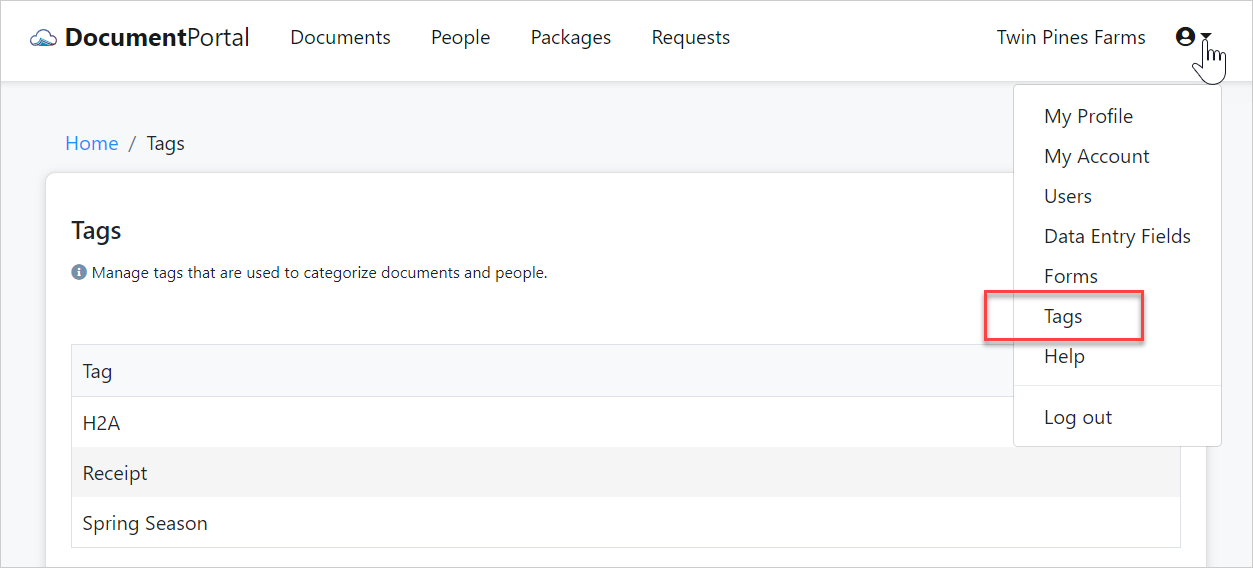
Click the "New Tag" button and add the tags H2A, Receipt, and Spring Season. Once you've finished, your list of tags should look like the above screenshot.
Continuing on
Now that you've created a few tags, we'll be able to use them in the following sections to categorize people and documents for easy retrieval.
| 3. Create a document request |  |
Comments
0 comments
Please sign in to leave a comment.